Monday, April 30, 2018

Top 5 Behavioral Interview Questions to Ask in 2018

As an employer, there's no right way to host a job interview. But you can ask each candidate the right questions to learn the most important things about them.

Learning what makes a person qualified to work for you is difficult, especially if you have just a half-hour interview with them in a conference room. Because of this time crunch, you might feel compelled to race through the candidate's resume, asking them questions about each job title and bullet point they've written down from top to bottom.

But if you want know what makes the applicant valuable to you, it's important to get to know them beyond their written job application. The best way uncover this value is to ask behavioral interview questions.

The most informative answers to behavioral interview questions don't just describe how a candidate behaved, but also how this behavior benefited them and the business.

To help you develop your list of questions, we've put together five of the most effective behavioral interview questions you can ask your job candidates, and explained what an answer to each question can reveal about the interviewee.

Top Behavioral Interview Questions (and What You'll Learn by Asking Them)

1. 'Tell me about a mistake you made during a project or at a certain point in your career.'

Think of this behavioral question as a more specific way to ask an interviewee: "What are your greatest weaknesses?" By asking candidates this question, you can discover many important things about them that you wouldn't learn from their resume.

Listening to a candidate describe a mistake they once made can show you how much self-awareness they have. The best answers indicate both their thought process in making that mistake and what they learned from it. Just because it was a mistake doesn't mean the candidate was being negligent -- encourage them to explain their choice and what they'd do differently today.

2. 'Tell me about a success you're particularly proud of in your career and why it was a success.'

Similar to the question above, think of this one as a better way to ask an interviewee: "What are your greatest strengths?" Pitching a question the candidate might find flattering and fun to answer can empower them to come out of their shell during the interview.

This is what makes asking about their past success so useful -- you can uncover more intimate details about their professional growth and the types of assignments they thrive on. The best answers to this behavioral question won't just reveal the work a candidate is most comfortable with, but also why this work plays to their skills and if those skills would be of use to your company.

3. 'Describe a time you had a conflict with a coworker, and how you resolved it.'

Candidates who know how to diffuse issues with their colleagues help foster the healthy, nurturing culture your company needs in order to grow.

Asking about the applicant's experience resolving a conflict with a coworker can reveal how diplomatic they can be toward differing opinions among team members. Specifically, employers can learn two big pieces of information about a candidate from their answer to this question: how they view themselves in conflicts, and where the candidate ranks their priorities in relation to the other employees involved.

It's not important that you agree with the resolution the candidate came to. It's more important that you can determine how effective their resolution was at accommodating everybody's -- and ultimately, the business's -- needs.

4. 'Tell me something you had to learn very quickly but knew nothing about before.'

This behavioral question is a popular one among employers today. It's simply not realistic to expect candidates to already know your business or industry when they first walk through the door. What's important is how fast they can learn. Want to find out if your applicant can learn the skills needed in your industry? Ask them how they've done so for others in the past.

Employers can infer a lot about candidates as they explain their past experience with a challenging new concept. Not only will you find out what subjects a candidate isn't often exposed to, but you can also learn how confident they are in unfamiliar territory.

Did an applicant's answer impress you? Ask them a bonus follow-up question: "How would you explain this concept now to someone who isn't familiar with it?" The answer can give you deeper insight into the applicant's learning style, as well as any mentorship potential that would allow them to pass on their knowledge to other employees.

5. 'Tell me about a time you had multiple assignments with conflicting goals or deadlines, and how you completed each of them.'

At some point in our careers, we all inherit a workload whose contents pull us in different directions -- and yet, everything in this workload needs to get done. So, if it's such a normal experience, what are you really getting out of posing the question above to your interviewee?

When asking about a candidate's experience with conflicting assignments, the insight you're looking for isn't how many things they can handle at the same time. It's how efficient they are at completing it all.

Ultimately, answers to this question can tell you a story of creative problem solving, letting you in on effective approaches to time management that the candidate might be able to bring to your team.

While questions that focus on a candidate's resume can give you appropriate context around the experiences they've had, it's crucial that you incorporate these behavioral interview questions as well. Ask a few of the above questions in your next interview -- whether it's in person or over the phone -- and see how they help you come to a final hiring decision.

Google Image Search Bug: Only Some Images Are Loading?

Image credit to Shutterstock There are a bunch of complaints in the Google Web Search Help forums about a bug with Google's image search where the images are not fully loading...

Samantha Noble: The Search Community Honors You

This is part of the say something nice about an SEO/SEM series - feel free to nominate someone over here. Samantha Noble is 34 years old and lives in South Coast of the UK not too far from Portsmouth with her son...

Google Doodle For Johann Carl Friedrich Gauss

Today on the Google home page is a special Google logo, Doodle, for Johann Carl Friedrich Gauà on his 241st birthday. Johann is a German mathematician who made his first groundbreaking mathematical discovery as a teenager...

Google Has A Human Size Bird Cage

Google Human Size Bird Cage

A Comprehensive Guide to Local SEO in 2018

Local search is powerful for small businesses: four out of five consumers use search to find local information, which means if your business isn’t optimized for local search, you could be missing out on 80% of your potential customers. In short, local SEO is critical if you want your business to stay relevant.

To help you optimize your business for local SEO, we’ve created a comprehensive guide, which will cover local SEO tools, local search best practices, how to optimize for Google My Business, and more. By the end of the guide, you’ll have a firm understanding on how to optimize your business to reach potential consumers who use local search to choose which products or services they’re going to buy.

Best Practice Local SEO Tactics

To thrive in local search, you need to do three things: optimize your Google My Business account, improve your on-page SEO by updating your website, and excel on the Wild Wild Web. While it might sound overwhelming, it’s entirely feasible to succeed in all three with some patience and perseverance. Stick with us, and we’ll explore each one in-depth.

Optimize for Google My Business

Google My Business has become the creme de la creme of local search -- since Google understandably feels most comfortable sharing content it can support and verify, Google My Business is their tool to help your business meet Google’s needs. If Google can verify your business as authentic, it will potentially reward your business with a coveted sidebar space in Google local search.

To ensure you’re optimized for Google My Business, you’ll want to create and verify a Google My Business page, use Google Posts within your account, encourage your customers to share reviews online, and respond authentically to reviews, specifying location. For example, “We appreciate your feedback on [product/service] in [city, state]. We value your input and look forward to working with you again. Thank you from the [full company name] team.”

To learn more about using Google My Business, check out our full post here.

Website Updates

Now that we’ve discussed optimizing your business for Google My Business, let’s take a look at five simple website updates to improve your local SEO.

1. Improve Internal Linking Structure 

Although external links pointing to your site are ideal (which I’ll discuss soon), adjusting your internal linking structure will also boost your SEO rankings.

Why does internal linking matter? It does the following:

  • Supports website navigation
  • Assists with information architecture and website hierarchy
  • Distributes page authority and ranking power among pages

If you want to improve your internal linking structure but aren’t sure where to start, check out Kissmetrics’ The Seven Commandments of Internal Linking for Top-Notch SEO.

2. Optimize URL, Title Tags, Headers, Meta Description, and Content

When it comes to content, every new blog post is a new indexed page for your site, a new page on which to target a geographic search phrase, and a new opportunity to get found in the search engine results pages (SERPs). Every time you write a piece of content, you need to optimize the content for search engines by using high-volume keywords in the URL, title, header, meta description, and body. If you're having trouble coming up with geo-targeted content, consider highlighting customer success stories and case studies.

3. Add Location Pages to your Website

If you have more than one brick and mortar location, create location pages. Location pages provide readers with your NAP, store hours, unique store descriptions, parking/transit information, promotions, testimonials from happy customers, and more. It's also important you avoid duplicating content across multiple location pages. For single location businesses, create a locally descriptive About Us page. You’ll get big time bonus points if you add a Google Map to your website on your respective location page(s).

4. Create Local Content

Google continues to get smarter, which means content creators are now able to truly write for users, not search engines. But while writing about general topics will attract a wide crowd, sometimes it’s more important to hone your focus and write about local or industry news to attract a local audience. Be the local authority for your industry by promoting local industry gatherings, news, employees, and other educational content on your blog. Think of top-of-the-funnel content that goes beyond what your business sells.

For example, if you're a local security company and you’re trying to attract businesses that are new to the area, create a helpful resource to get these businesses well-acquainted with your city. A map of local service providers or a calendar of city-wide events could both provide value for your persona and contain highly relevant on-page local signals.

5. Ensure your website is mobile-friendly

Local search and mobile search go hand in hand (nine out of ten smartphone users conduct local searches on their devices!). Some of the most common ways people will use your site in a mobile environment is to look up reviews, find directions to your location, and search for contact information. Make it easy for your prospects and customers by making your site mobile-friendly.

Engage with Directories and the Wild Wild Web

You’ve learned how to optimize your business for Google My Business and how to update your website for an internal SEO boost -- now, let’s take a look at how you can use NAP consistency, directories, and inbound links to take your business one step closer to that number one spot on local search.

Name, Address, Phone Consistency

You've got to make it easy for people and search engines to find you. To do this, set up your NAP, which stands for name, address, and phone number (with area code). This should be included as crawlable HTML text on your site. Avoid the common mistake of only including the NAP within an image -- images can’t be crawled from search engines like HTML text. The most common location for the NAP is in the footer or header of the site.

Optimize Online Directories and Citations

For United States companies, these four map data aggregators provide a large amount of the map data for Apple, Yelp, Bing, Google+ local, Trip Advisor, and more.

Consistency is key: verify that your citations are consistent and complete across these four data aggregators. Discrepancies like misspellings, abbreviations, lack of suite number or wrong phone number can be problematic. If Google can’t determine which information about your business is correct, it may not show your business at all in search results. Additionally, be sure to remove any duplicate listings you find. Bonus points for emphasizing a Chambers of Commerce membership in your community, which will garner you an external inbound link.

Get Inbound Links with Relevance and Authority

Inbound links are incredibly powerful opportunities to boost your local SEO -- every inbound link tells Google you’re a legitimate company, and inbound links can also raise your domain authority. Here are a few ways to get inbound links:

  • Sponsorships or Partnerships
  • Guest Blog Posting
  • Scholarships

Start with your own personal network, which may include the Chamber of Commerce, business improvement districts, licensing bureaus, trade associations, resellers, vendors, and/or manufacturers and other affiliates. Consider sponsoring a webinar or meet-up, hosting a community event, promoting something local you love, and building relationships with prominent people and influencers. Additionally, learn to feel comfortable reaching out to partners to see if they can feature you on their partner directory.

Be a guest blogger, talk to and about (positively, of course!) other people in your industry, and act as a resource provider for the community. If you're an active participant in community conversations, the buzz around you grows in the form of inbound links, social media growth, and media coverage.

Given that .edu links are the bee’s knees for domain authority, why not earn some links by featuring a scholarship in your geographic region? It should be relevant to your industry, send the right signals to your domain (given the backlinks from schools) … and make you feel good, too! Moz built up a solid guide on the steps to success for effective scholarship outreach.

Engage with Social Media and Add Posts to Google My Business

Google considers content shared on social media more important now than ever before. Now that you’ve carved out a beautiful Google My Business page, share the page on social media, further aligning social and search.

Local SEO Tools

Now that we’ve covered how to optimize your business for local SEO, let's explore some useful tools you can leverage to improve your ranking in the areas where it matters most.

1. Whitespark Local Citation Finder. A local citation is any online mention of the name, address, and phone number for a local business. Citations matter because they help surface local businesses in online search, and when local businesses actively manage their citations to ensure data accuracy, it promotes trust of these online listings. Whitespark knows this realm well -- really well. With a free starter version and a popular $24/month option, Whitespark offers local listing management, recommends where to list your business, examines your competition, and robustly builds and monitors your citation growth for better local search rankings.

2. Screaming Frog. This desktop program crawls websites' links, images, CSS, script and apps from an SEO perspective. Curious if you have any 404’s? Wondering about missing meta descriptions or H1’s? Screaming Frog will analyze up to 500 URLs for free and offers an unlimited paid version for $200/year.

2. Moz Local. Less expensive than most of its counterparts (starting at $99/year with a professional level of the service at $179/year), Moz Local will ensure your business listing has been verified on Google and Facebook, and distribute your listing across the search ecosystem. Additionally, Moz Local will collaborate with data aggregators to help push listings, ensuring your business gains visibility.

4. Ahrefs. Ahrefs helps with backlink checking, which is important as these links (which are directed toward your website) serve as an indicator of website authority. Ahrefs also offers competitor analysis, keyword research, and insight into the anchor text other websites use when backlinking to your site. This tool has a starter version at $99/month and a standard option at $179/month for more extensive tracking.

5. Buzzstream. Starting at $24/month with professional functionality at $299/month, BuzzStream facilitates earning local backlinks, which helps you identify and build relationships with local influencers by researching influencers, tracking conversations, and providing reporting insights into your outreach campaigns, team performance, and link placements.

What’s Next?

This Comprehensive Guide to Local SEO in 2018 is intended to drive your local success. While some of the tips are one-off activities where you can set it and forget it (e.g. making sure your NAP is clearly written on your site), other tasks, such as building reviews and publishing locally relevant content, is an activity your organization needs to do on an ongoing basis for long-term local SEO success. Keep both in mind as you work toward better online visibility and we look forward to seeing you on the first page of Google!

8 Types of CTAs you Should Be Using in Your YouTube Channel

Remember those speech bubbles that used to pop up at the start of almost every YouTube video years ago? They would instantly cover your screen, screaming “Subscribe to my channel!” or “Watch my next video!”, forcing you scurry over to your mouse and click exit on every bubble before they completely ruined the beginning of the video you were trying to watch.

Even though those omnipresent bubble CTAs could get on your nerves, YouTube decided not to get rid of them entirely. They knew how important CTAs were for channel managers to boost views, watch time, and subscriptions, so, over the years, they made a concerted effort to keep enhancing their call-to-action capabilities. Now, CTAs more seamlessly blend into videos, and provide a much better user experience.

YouTube CTAs can be a valuable way to drive viewers to your website and social media pages, so read on to learn about the eight types of YouTube CTAs that’ll not only boost your YouTube presence, but your entire presence online.

8 Types of CTAs you Should Be Using in Your YouTube Channel

1. Beginning of the Video CTA

According to KissMetrics, 20% of viewers bounce from videos that are only 1 minute long and 40% of viewers bounce from videos that are 2-3 minutes long. If a significant chunk of your viewers bounce from your video before they even reach the CTA, placing it at the beginning of the video and leaving it there until it ends could generate more clicks. People who usually bounce before your video ends will have a chance to click on it, and the people who watch the video all the way through, who are also most likely to complete your desired action, will have a chance to click on it too.


2. Suggest Another Video CTA

If your audience starts dedicating entire YouTube watch sessions to only your videos, your brand trust and affinity will skyrocket. This will also boost your videos’ watch time, which is significant factor in the YouTube ranking algorithm. To get your audience to keep watching your videos one after another, you should suggest related videos that they’re more likely to watch than the suggested videos YouTube’s autoplay function recommends.

Yes Theory does an excellent job of this. At the end of each of their videos, they prompt viewers to click on videos that are most relevant to the one they just watched, which has helped their channel garner over 128 million video views and 1.4 million subscribers.

3. Subscribe to Channel CTA

Subscribers are important to your channel because YouTube will send them notifications about your new videos and feature your videos on their homepage. This means they’ll see your videos more frequently, which will help you generate more views. Subscribers tend to watch your videos longer than non-subscribers too, so the more subscribers you have, the more watch time your videos will accumulate, and the more likely YouTube will rank them higher on search and feature them in the related section. YouTube also keeps track of the number of viewers who subscribe to your channel right after watching one of your videos. So if one of your videos attracts a lot of new subscribers, they’ll reward it with higher rankings and more features in the related section.

Business Insider does a great job of driving YouTube subscriptions by featuring an engaging CTA during their videos’ last 15 seconds, giving users ample time to subscribe.


4. Follow On Social Media CTA

If your audience likes watching your YouTube videos, they’ll probably enjoy consuming your content on social media too. By putting social media buttons in your videos, your most loyal YouTube subscribers could also turn into your most engaged social media followers.

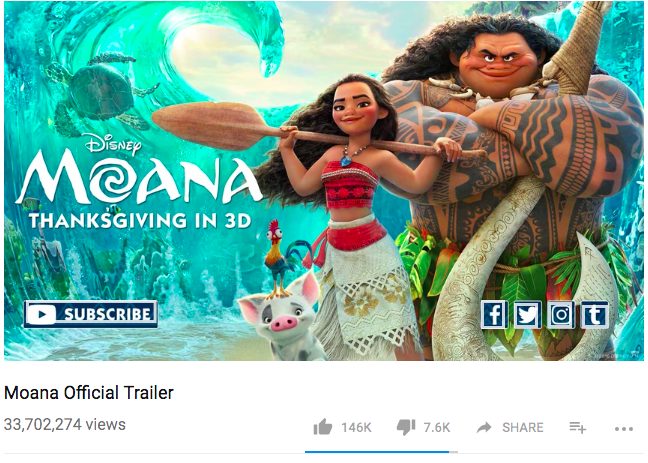
Walt-Disney leveraged social media buttons by placing them at the end of Moana’s trailer on YouTube. This encouraged people to follow the movie on Facebook, Twitter, Instagram, and Tumblr, allowing Walt-Disney to consistently push content about Moana to their new followers and generate more hype and awareness for the movie.


5. Lead Generation CTA

In addition to using blogs, social media, and email marketing to promote your top performing lead generation content, you can also attach them to your YouTube videos. These videos can either educate your viewers on the same subject matter as your lead generation content or they can preview it, like this HubSpot video below:

6. Drive to Website CTA

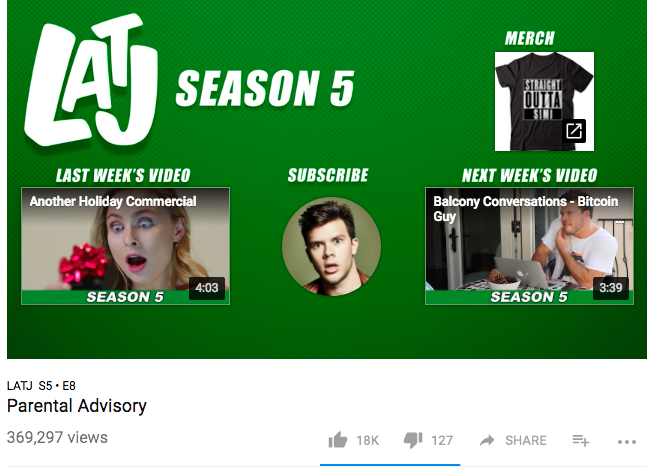
When college students are in the midst of a two hour YouTube binge fest, you can probably blame Jimmy Tatro for it. He’s built an incredibly loyal and engaged following by making hilarious videos that millennials everywhere can’t get enough of. One way he monetizes his channel’s popularity is by placing an end-of-video CTA that drives viewers to his clothing store, where he sells shirts that rep his YouTube channel, LifeAccordingToJimmy, and his YouTube show, The Real Bros of Simi Valley.

If you have a very loyal and engaged YouTube audience like Jimmy Tatro does, try guiding viewers to your product page after they watch your videos. When they’re hooked on them and love your brand, they’ll definitely be willing to support you.


7. Description CTA

If you don’t want to bombard your audience with pop-up CTAs during your video or if you run out of room to place CTAs on your end screen, you can use the description section of your videos to encourage viewers to take a desired action -- most people read descriptions before or after they watch a video.

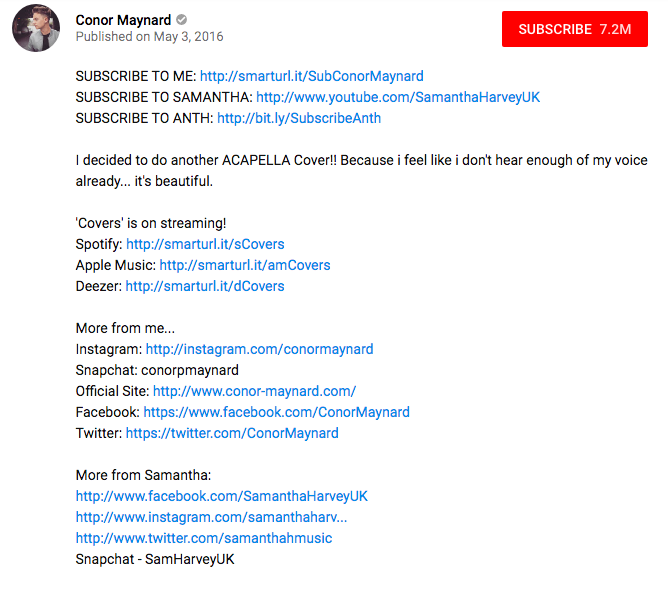
Conor Maynard is a singer who uploads viral covers on YouTube, and he attracts subscribers, Spotify streams, and social followers by promoting his channel page, Spotify page, and social profiles in the description of his videos.

8. Auditory CTA

About a month ago, Backlinko analyzed 1.3 million YouTube search results and discovered a statistically significant correlation between comments and ranking. They also discovered when viewers share your videos on social media through YouTube’s own social buttons, they’ll boost your video rankings. Since YouTube uses video comments and social shares to gauge whether your video is high-quality, you should ask your viewers to share your video on social and spark debate in the comments by asking them to continue the conversation your video started.