Tuesday, March 3, 2020

The 7 Best Social Media Analytics Tools for Marketers in 2020

Social media is an undeniably powerful marketing tool in 2020.

We've seen the stats that back up using social media as a legitimate business practice. And we've seen examples of companies that saw phenomenal ROI after a social media campaign.

But how are marketers managing multiple social accounts, encouraging proper engagement, and analyzing and proving their social platforms ROI?

With social media analytics tools.

In a nutshell, social media analytics tools are generally part of a larger social media management software platform. They collect data from connected accounts, such as engagement, reposts, and replies, and compile them into reports that break down the numbers, providing you with insights about the performance of your brand online.

Social media analytics tools are at the heart of knowing how to communicate with your audience online, where to target them, and how to prove the value of social media to decision-makers.

To cut the expansive search of social media analytics tools down, (there are a lot) we've made a list of seven top options that we recommend, depending on your business type. These choices have expansive features and tools, offer a trial period, and in some cases, are even able to integrate with your HubSpot account.

1. HubSpot

Price: Marketing Hub Professional: $800/mo.

HubSpot's analytics tools offer social reports that compare the performance of multiple social channels to measure campaign performance. To aid with monitoring engagement, HubSpot's software allows users to publish on the go directly through the CRM.

Below is a screenshot of an analytics report HubSpot provides. It offers expansive graphs and visuals that break down the numbers by specific platform features, like audience, session lengths, and impressions.
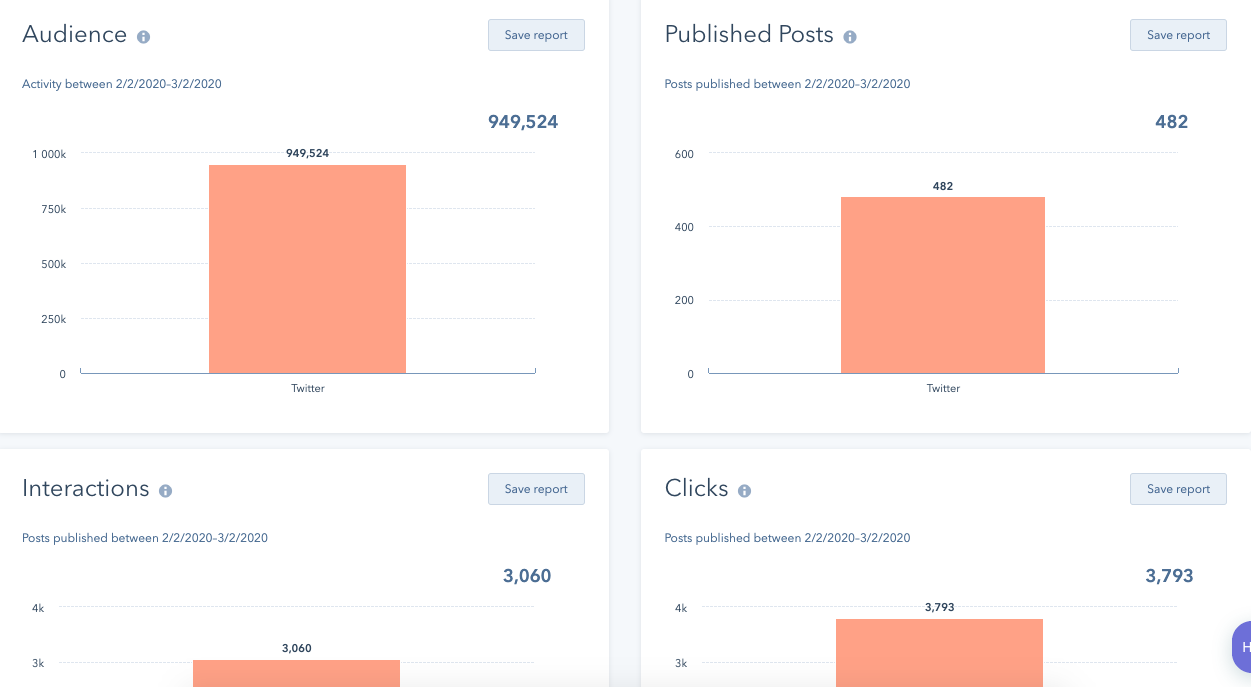
Example of HubSpot reporting

When monitoring performance using HubSpot, you'll have insights on your customers through their entire journey, as well as which marketing messages perform the best among your audiences.

HubSpot is an excellent choice for businesses of any size, whose marketing teams want to keep all campaign functions in one place. Its integrations make that process more streamlined, and the detailed social performance reports break down and analyze the hard numbers for you.

2. Mailchimp

Price: Free, then $9-$299/mo.

Mailchimp is a full-service marketing platform that offers analytics for social media. I love Mailchimp because it's easy to use for small marketing teams and requires little time to pour over the accompanying analytics.

Here's a screenshot of how campaign data looks on Mailchimp. This is a sample report that gives a high-level overview of audience insights, demographics that are crucial when planning a social media campaign.
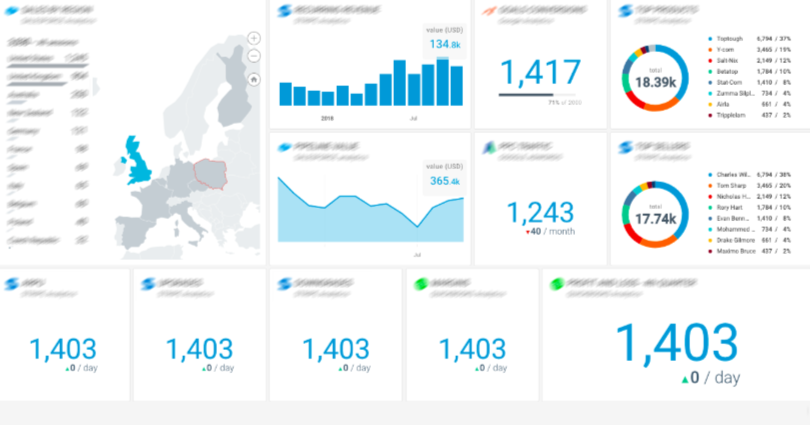
Example of Mailchimp reporting

Source

With Mailchimp, you'll also have an audience dashboard, which is a page dedicated to understanding audience behavior. Additionally, the software offers tools to look into smart targeting and mobile integrations. These tools can diversify a social strategy and deliver higher engagement numbers by helping you create content specific audiences will respond well to.

This platform is a great idea for teams that need social media analytics tools that guide you towards creating a more holistic, impactful strategy.

3. Databox

Price: $49-248/mo.

Databox is an expansive analytics platform that puts all business data in one place. The platform lets you set campaign goals with your account and track them for their duration.

This screenshot gives an audience overview from a social profile, including graphs and session data.
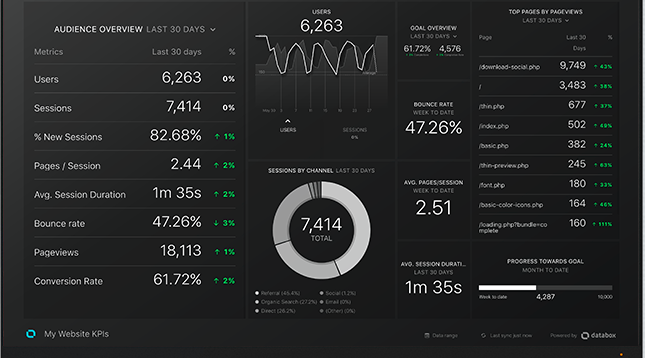
Example of Databox reporting

Source

The key performance indicators (KPIs) of success on social media channels will be shown on the same dashboard.

You can customize metrics that matter most to your campaign or social channels for your reports. For instance, if you wanted to track just Twitter replies, you can customize that. These tools let you remain focused on the metrics you need to have.

Any integration you have, such as HubSpot, will also be visible from the dashboard, as well.

Databox is a good choice for businesses that have many contacts and social accounts to keep track of, many specific campaign goals by channel, or manage social accounts for several clients.

4. Grow.com

Price: Contact for pricing

Users of Grow.com software are able to access full visibility of engagement for social accounts. The tool connects to HubSpot, Salesforce, Google Ads, Facebook, Marketo, and Microsoft Office, so you can combine the software with any other tools you use for social monitoring or listening.

Below is an example of a Grow overview for sales and marketing. Notice how the expansive options are similar to Google Analytics, offering audience location, behavior, and trends.
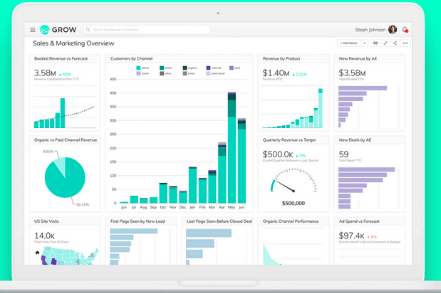
Source

Grow.com breaks down complex data into graphs and visuals. Another perk of using Grow.com is that social reports are sharable, and you can integrate your account with HubSpot's ecosystem tools. This is helpful for multiple teams working on the same project at once, since it can provide consistent, accurate data to various team members at once.

If your team wants a full-service platform for marketing and sales data, Grow.com is a good option. Grow.com's analytics reports are built with metrics chosen by the user, so it's a great tool for customizing, too.

5. ActiveCampaign

Price: $9/mo

ActiveCampaign is email marketing software that provides a ton of social features, including reporting. You can connect Facebook, Twitter, Digg, and other social media platforms to gather insights of performance across those social media sites.

Here is a sample ActiveCampaign custom reports page. This is a blank slate, but you can see you have options to configure campaigns and templates onto your dashboard.
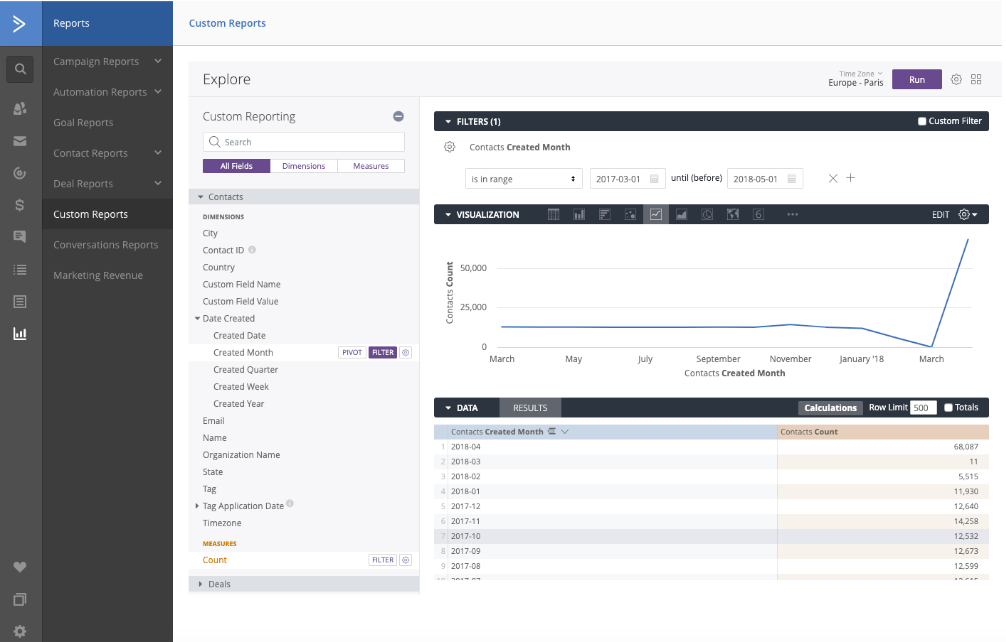
ActiveCampaign example

Source

Using this software, you can see how emails are performing, as well as campaign performance in general. Since you'll have both social media and email metrics in one place, this is a good option for businesses with a heavy email marketing focus.

Additionally, another cool feature about ActiveCampaign is that its reports track what contacts do after they click through to your site. Further, if you're a HubSpot customer, the software integrates with your HubSpot account.

6. CoSchedule

Price: $12.50/mo

Reports are CoSchedule's specialty — in fact, CoSchedule gathers social network, campaign, and engagement reports for your social profiles automatically, and its software compiles real-time data and tracks engagement statistics.

These engagement statistics, like the example pictured below, are formulated and collected to diminish guesswork needed on how to connect with followers. You'll be able to see the top fans of your social accounts, making it easier to create targeted content for them.
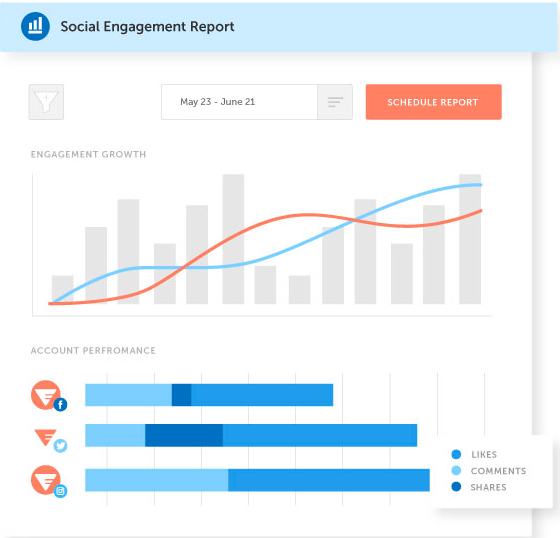
CoSchedule engagement report example

Source

On a CoSchedule dashboard, you can see a birds' eye view of unique data from campaigns, old and new. That way, you can compare multiple campaigns to determine the evolving ecosystem of audiences. If that's not for you, that's no problem — you can opt-out of having it on your dashboard.

CoSchedule is a good choice for companies that depend on reports for ROI. Plus, it's always a nice choice if you want to see the difference in audience behavior over time, to get a clearer picture of an ideal buyer's journey.

7. Sprout Social

Price: $99-$249/mo.

Sprout Social is a social media planning service that, as do many other platforms, offers expansive analytic reports of the performance of social media accounts.

Additionally, if you're a HubSpot customer, you can integrate HubSpot with Sprout Social to collect accurate social reports all in one place.

Here is an example of a Twitter Engagement report from Sprout Social. Notice how you can customize the report, add widgets, and switch between other social engagement reports.
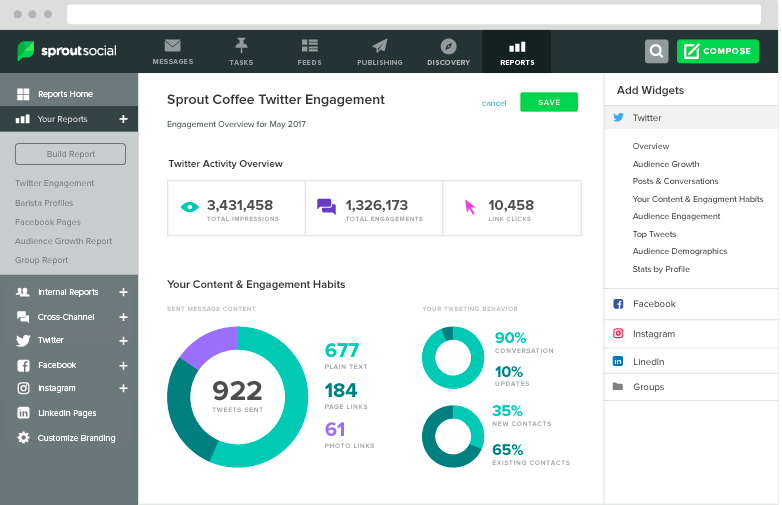
Sprout Social engagement report

Source

You can configure the metrics your reports provide, and choose options that scale with your business. For instance, you might not need to analyze ROI from an Instagram campaign now, but if needed in the future, you can have that option.

Sprout Social is beneficial if you are looking for a system that's configurable and able to be integrated. It's a flexible platform that offers reports curated to your specific social media goals with colorful graphs and expansive data.

Ultimately, choosing the right social media analytics tools for your business shouldn't be a stressful process. The tools should align with your business goals and deliver the metrics you need to be successful.

Tools should also be able to work with the budget and time you have available, so if one of these choices seems to tick all of those boxes for you, check them out. Your social strategy will only be helped by having the correct tools on-hand.

Monday, March 2, 2020

Daily Search Forum Recap: March 2, 2020

Here is a recap of what happened in the search forums today...

How Long Should Blog Posts Be in 2020? [New Data]

If you're a blogger, you've probably asked your editor "how long should this blog post be" more times than you'd care to admit.

And most of the time, you'll hear an answer that sounds something like this: "However long it needs to be."

There's certainly a nugget of truth in there — you shouldn't beholden yourself to a character count that's either too low or too high. However, any experienced blogger will tell you that there is an ideal length or range for how long your blog posts should be, especially when you take certain criteria into account like your audience, the topic, the structure of the post, and what your main promotional channel is.

We've published thousands of blog posts here at HubSpot, and we analyzed our top-performing ones to see how blog post length impacts success in all of these areas.

Read on to see how long your blog posts should be in 2020.

Ideal Blog Post Length for SEO 2020

For SEO, the ideal blog post length should be 2,100-2,400 words, according to HubSpot data. We averaged the length of our 50 most-read blog posts in 2019, which yielded an average word count of 2,330. Individual blog post lengths ranged from 333 to 5,581 words, with a median length of 2,164 words.

But before you go writing your 2,300 word blog post, keep in mind that not all blog posts need to be super long — in fact, 16 of our top 50 read posts (or about one-third) were under 1,500 words, so there's still plenty of opportunity to get your posts ranking even with a lower word count.

This can be accomplished by following SEO best practices, including:

  • Proper backlinking.
  • Attempting to capture Google's featured snippet.
  • Adding alt-text.
  • Going after the right keywords.
  • Achieving domain and topic authority.
  • Incorporating media-rich content in your post body (videos, social media embeds, etc.).

For an overview of everything that goes into getting a blog post to rank on Google outside of word length, check out this blog post.

Ideal Blog Post Length for Lead Generation

Unfortunately, there's often a disconnect between the posts that generate traffic and those that generate leads or new contacts for your business.

Typically, posts that get more traffic do so because they're searched for by a wider audience, which sometimes means the topic you've written about is more generic and doesn't align closely with your business.

To speak to this gap, we looked at the 50 posts that brought in the most net new leads for HubSpot in 2019 to see if there was a difference in average length, and to see if writers should adjust post length for posts written to generate leads.

Spoiler alert: there was, and they should.

Based on HubSpot's data, the ideal length of a blog post intended to generate leads is 2,500 words. The 50 posts that generated the most leads in 2019 were an average of 2,569 words long and had a median length of 2,529 words, which is approximately 250 and 400 words longer than the average and median lengths of the most-read blog posts. The longest post in this cohort was 8,197 words, or approximately 2,500 words longer than the longest most-read post.

So, for a blog post intended to build your contact database, writing longer content definitely works in your favor. Longer content reinforces your knowledge and authority on a subject — particularly if it's a keyword or a topic for a very specific audience. When your coverage is more in-depth for these ideas, you increase your chances of ranking better — and while your audience might be smaller, your chances of converting readers into leads are far greater.

Ideal Blog Post Lengths for Different Blog Post Types

We didn't stop there: there are different types and formats of blog posts, so we wanted to see how blog post length impacted the performance of these different post structures.

How long should pillar pages be?

Pillar pages should be around 4,000 words, since they are supposed to cover significantly more content than an average blog post.

A pillar page is your attempt at being the all-encompassing guide to any given subject available on the Internet as a blog post. These posts serve as the "pillar" to a cluster of blog posts, all of which relate to the topic explained in the pillar. You can learn more about pillar pages by watching the video below.

To arrive at the suggested 4,000 word blog post length, we averaged the lengths of our most-read pillar pages in 2019 and found an average of 4,048 words and a median length of 3,639 words. Word lengths for these pillar pages ranged from 2,137 to 10,939 words.

That amount of words might seem scary, but keep in mind how extensive the work that goes into pillar pages — and the content that they cover — should be. Pillar pages should take several days to write, cite multiple sources, and link out to all of your related blog posts on the subject. The work will pay off, however, and you'll likely see more traffic to the pillar post and the supporting cluster content.

Need help getting started with writing pillar pages? Try using our free blog post templates for organizing and writing your pillar pages.

How long should listicles be?

Listicles, or list blog posts, should be 2,300-2,600 words.

List blog posts are probably the most approachable blog post format for new bloggers. Anyone can make a blog post just by listing off and explaining a few examples, tools, resources, or ideas for a given topic. When it comes to the length of these blog posts, it seems that the rule of thumb is: the more examples, the better.

HubSpot's most-read listicles in 2019 were an average of 2,574 words and had a median length of 2,332 words. They ranged between 1,040 and 5,581 words in length. All of these numbers are either around the same or higher than the lengths for the average blog post, suggesting that list blog posts perform better when they are longer.

And if you think about it, this makes total sense. When you search for a list of ideas or examples, would you rather see a list of five or a list of fifty? This post format demands plenty of list entries -- preferably with images, explanations, and links to their original sources -- so put in the effort to build an authoritative and complete list for your readers.

You can use these free listicle blog post templates to get started writing your list posts today.

How long should "how-to" blog posts be?

How-to blog posts should be between 1,700 and 2,100 words.

Because how-to posts describe, well, how to do something, the ideal length of the blog post depends on how difficult it is to do what you're explaining how to do. For example, this blog post on how to type the shrug emoji is just over 300 words, while this blog post on how to start a business contains more than 8,000.

For our top-read how-to blog posts, we saw an average length of 2,151 words and a median of 1,669 words. While this a rather large range, it shouldn't be too surprising, since readers don't need too much -- or worse -- too little information on how to accomplish their desired task.

Writing a how-to blog post for the first time? Remember that they should be concise and clear, contain section headers, and leave little or nothing to the imagination. Readers are coming to you for instruction, not inspiration, so ensure the post succinctly covers your chosen topic. You can also use this how-to blog post template if you need help organizing and writing the post.

How long should "what is" blog posts be?

"What is" posts, or blog posts that answer a question (such as the one you're reading right now), should be between 1,300 and 1,700 words (which this one is!).

This type of post is definitely the poster child for making blog posts "as long as they need to be." When readers search for what, who, or when something is, they typically want a quick answer or explanation. Based on our data, bogging readers down with too much unnecessary information doesn't always equate to more views -- 30% of the HubSpot's most-read "what is" posts are less than 1,000 words.

If you need help structuring these posts and keeping them short, try using these blog post templates.

Minimum Blog Post Length

Technically, there is no official minimum for blog post length, though Yoast recommends at least 300 words. That said, HubSpot data suggests writing longer posts should be the rule rather than the exception for your blog. This practice will help your website build authority in the eyes of search engines, which can help shorter blog posts rank better.

"Generally, it's easier for longer content to rank," says Aja Frost, HubSpot's Head of Content SEO. "But unless you're publishing hundreds of [blog] pages with less than 100 words, you won't get dinged for thin content."

While longer blog posts tend to perform the best, that's not to say that every single blog post you publish must be more than 2,000 words. If you feel you've covered your topic well enough in 300, 800, or 1,000 words, then so be it.

Getting Started With Your Blog Posts

Now that you know how long your blog posts should be, it's time to start writing! We've compiled a list of resources you can start utilizing today to make your blog more successful.

Vlog #50: Aleyda Solis - International SEO Star On How To Optimize Your YouTube Videos

Aleyda Solis, the EU Search Personality of the Year, one of the most respected international SEOs in the community...

Google Weekend Search Algorithm Ranking Fluctuations & Chatter

Over the weekend, like between February 28th, February 29th and March 1st, there was significant chatter within the SEO community and this time it was backed by some of the automated tracking tools. The chatter seems to have potentially died down a bit now but it might be too early to tell.

Google: Logo Placement Does Not Impact SEO & Search Rankings

Every now and again you hear these SEO myths that just surprise me. Here is one, where someone was told that the placement of the company logo in a design impacts SEO. The feedback the designer got was that placing the logo in the middle of the head would hurt SEO and Google rankings.